

For thirty years the website interaction model has been the same: read, scroll, click, type. The newest change is bigger than a design trend. Visitors can now press a microphone button and simply talk to your website, and it answers back, out loud, in a live conversation.
This is not the robotic voice-menu experience anyone dreads. Real-time AI voice crossed a quality threshold recently: latency dropped low enough that conversations feel natural, and the assistant behind the voice can actually do things, like answer from your real content and book an appointment. Here is what practice owners should know while this is still early.
What a voice AI widget actually is
A voice AI widget is a microphone-enabled surface on your website. A visitor taps it and holds a spoken, two-way conversation with your site's AI assistant, entirely in the browser. No phone call, no app download, no "press 1 for hours."
Under the hood it streams audio to a realtime AI model and back, which is why it feels like conversation rather than dictation-then-wait. Major platforms are now shipping this: it exists as an emerging category across AI vendors, and even GoHighLevel recently added a voice chat widget, which tells you where the market believes this is going.
A concrete picture: a 58-year-old visitor with wrist pain finds your site on her phone. Typing a paragraph into a chat window on a phone keyboard is exactly the kind of friction that makes people give up. Instead she taps the mic and says, "I've had wrist pain for three weeks, do you treat that, and what would a first visit cost?" The assistant answers out loud from your services page, offers two appointment times, and she says "the Tuesday one." That entire interaction took under two minutes and never required her glasses.
Why this matters specifically for health and wellness
Three reasons this lands harder for practices than for, say, a software company:
Your patients ask sensitive, specific questions. "Do you work with postpartum anxiety?" is easier to say than to type into a form. Voice lowers the activation energy for exactly the hesitant visitors you most want to reach.
Not everyone types comfortably. Older patients, people on phones, people with accessibility needs. A voice option meets them where typing was the barrier.
The phone habit is already there. Many patients default to calling because talking is their comfort mode. A voice widget gives them the talking without the phone tag, and it never rings out.
Text chat, voice widget, or AI phone: which is which?
These three get conflated constantly, so here is the clean split:
Website text chat | Website voice widget | AI phone receptionist | |
|---|---|---|---|
Where | Chat bubble or answer bar on your site | Microphone in the same widget | Your actual phone number |
Visitor effort | Typing | Speaking, in the browser | A normal phone call |
Best for | Quick questions while browsing | Typing-averse visitors, mobile, accessibility | Callers, after-hours, the phone-first crowd |
Books appointments | Yes | Yes | Yes |
In Hiveality | Built into AI Chat |
The strategic point: these should not be three products with three knowledge bases. A visitor who chats on Tuesday and calls on Thursday should be talking to the same assistant that knows the same things and writes to the same contact record.
What to require before turning voice on
Voice raises the stakes on trust, so hold any implementation to four standards:
Grounded answers. The voice should speak from your real website content and admit when it does not know, never improvise medical claims.
No stored audio. Ask directly: is visitor audio recorded and kept? The right answer for a practice is no.
A path to action. A voice conversation that ends with "visit our booking page" wasted the medium. It should book, capture the visitor as a contact, or both.
A graceful fallback. Visitors who do not want voice should get the same assistant by typing.
How it works in Hiveality
Voice is built into Hiveality's AI chat, not a separate product. Turn it on and the microphone in your chat widget or instant answer bar opens a live spoken conversation with the same assistant that powers your text chat: same knowledge from your published content, same ability to complete bookings, same contact capture into your CRM. Audio is never stored, sessions have sensible limits, and if you leave voice off, the mic becomes simple dictation, turning speech into a typed message.
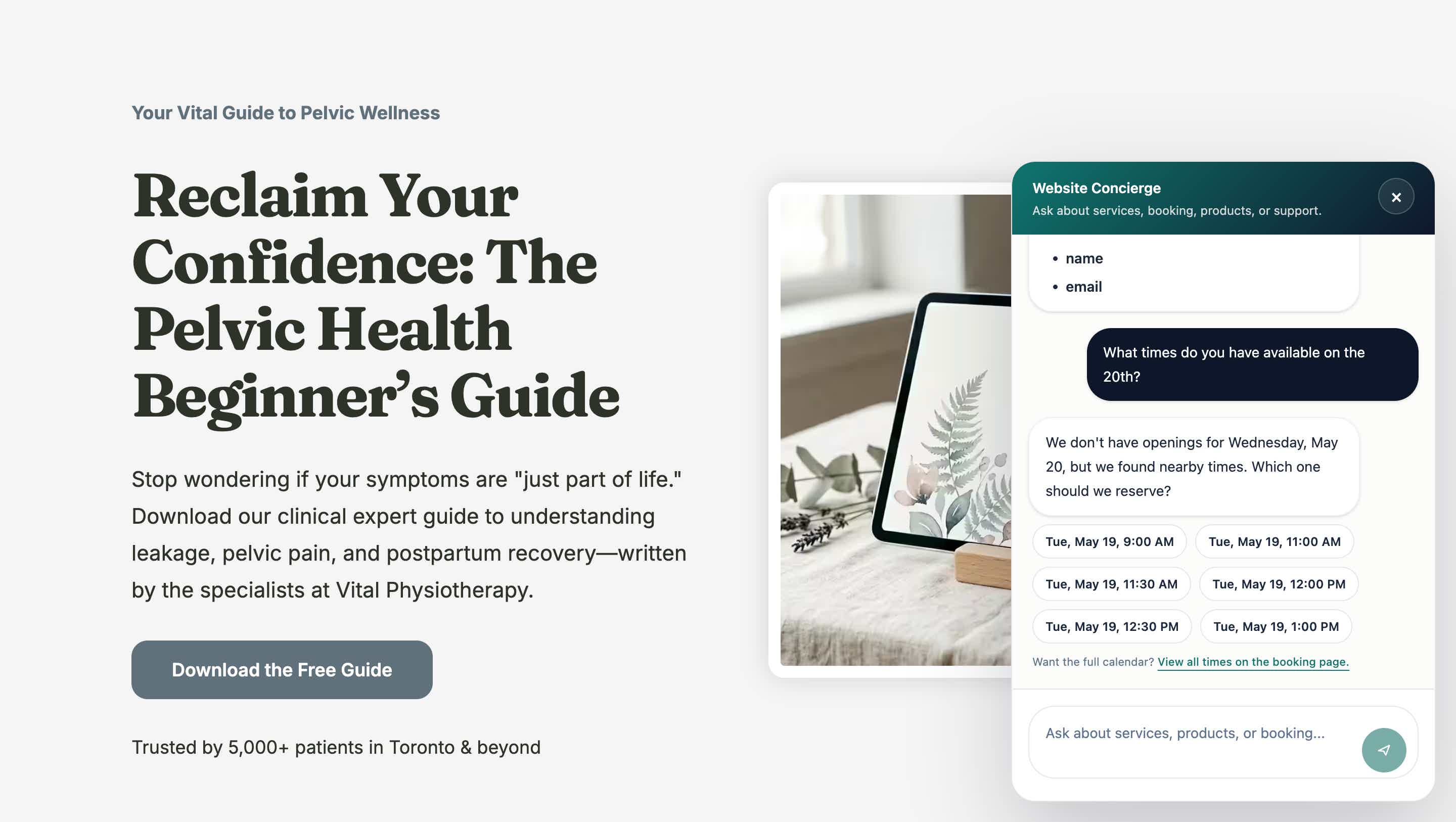
And it extends past the browser: the same assistant can answer your actual phone line as an AI receptionist, so "talk to the practice" works whether the patient is on your homepage or dialing your number at 9pm.
The early-mover window
Search interest in voice AI for websites is just forming, and almost no practice websites offer it yet. That creates a rare two-sided advantage: visitors remember the first site that talked back to them, and the practices that adopt now will own the local "wow, their site can do that" word of mouth while competitors are still adding basic chatbots. These windows close; the chatbot one already has, which is why our chatbot comparison is a crowded field and this article mostly isn't.
A practical way to introduce it: mention it. A single line on your homepage or in your welcome prompt, "prefer to talk? tap the mic," converts the feature from hidden capability into a moment patients tell their friends about.
Frequently asked questions
Will patients actually use voice on a website?
Not all of them, and that is fine. It is an additional door, not a replacement. The visitors who use it, often the ones least served by typing, are incremental conversations you were not getting.
Is the audio recorded?
On Hiveality, no. Audio is never stored. The conversation produces a transcript for your records, the same as text chat.
Does it work on phones?
Yes, in the mobile browser, which is where the typing friction is highest and voice helps most.
What does a voice conversation cost me?
On Hiveality it is part of the platform, with configurable session limits and hard budget caps so usage can never surprise you.
How is this different from Siri or Alexa?
Those assistants know the internet in general. This one knows your practice specifically, because it reads your website, and it can act: booking real appointments and capturing real contacts, not just answering.
The bottom line
Every few years the way patients expect to interact with you shifts, and the practices that move early collect the advantage cheaply. Voice on the website is that shift, and turning it on takes minutes if your site already runs on a platform that has it built in. Start here.
Related Posts

Best AI Chatbot for Health & Wellness Websites (2026)
Most website chatbots answer questions and stop there. For a practice, the chatbot that wins is the one that books the appointment and captures the visitor. An honest 2026 comparison.

What Actually Moves When You Migrate Your Practice Website?
The fear of losing rankings keeps practices on platforms they've outgrown. Here's exactly what moves in a website migration, how 301s protect your SEO, and a real 23-URL worked example, with the done-for-you option explained.

What Does a Practitioner Website Actually Cost in 2026?
The website is never the whole bill. Real 2026 numbers for what practitioners pay across email, Zapier, funnels, quizzes, booking, courses, and SEO tools, versus the all-in-one route.